


👋 Get weekly insights, tools, and templates to help you build and scale design systems. More: Design Tokens Mastery Course / YouTube / My Linkedin

When I connected 105 MCP tools to my design system, I thought it was AI-ready. It wasn’t.
The tools could read the surface: tokens, docs, components, Figma. But they did not know why a pattern had been rejected, because that memory lived across Slack, ADRs, and Figma comments. I had given the agent access. I had not given it memory.
This is why I think memory is the design system advantage.
The shift is simple: stop asking whether your agent needs more tools. Ask whether it can find the decisions your team has already made. The advantage is the memory your company has and whether your agent can use it, not the model, the number of tools, or the clever prompt.
Companies are already feeling the AI ROI problem. They have bought the tools. They have run the demos. They have a dozen teams asking agents to write code, summarize research, generate flows, review tickets, and clean up docs.
But the hard part is whether the agent has enough trusted context to do useful work without constant correction.
Some companies have too much data. Thousands of docs, tickets, meetings, comments, specs, research notes, and decision threads. The agent can technically read them, but it has no idea what matters.
Some companies have not enough usable data. The important decisions exist, but only as memory, buried Slack threads, or comments in files nobody will open again.
Both create the same failure.
You end up babysitting the agent. You correct the same wrong assumption three times. You explain the same component history again. You remind it that the team deprecated that pattern last quarter. You paste the context that should already be known.
If you do not want to babysit your agents, you have to be smart with your data.
Bad context is expensive

Every wrong answer has a cost. Every retry has a cost. Every agent loop that reads the wrong files, summarizes the wrong docs, or repeats a rejected pattern burns tokens before it burns trust.
The Verge reported that Microsoft is winding down most internal Claude Code usage in its Experiences + Devices group by the end of June and moving engineers toward GitHub Copilot CLI. The decision was framed as platform convergence, but The Verge also reported that financial pressure was part of the move.
Uber hit the same wall from a different direction. Its CTO Praveen Neppalli Naga told The Information:
I’m back to the drawing board, because the budget I thought I would need is blown away already.
Axios reported an even cleaner version of the problem from inside Nvidia. Bryan Catanzaro, Nvidia’s vice president of applied deep learning, said:
For my team, the cost of compute is far beyond the costs of the employees.
Gartner’s forecast makes the pattern more obvious. Token prices may fall by more than 90 percent by 2030, but agentic systems can require 5 to 30 times more tokens per task than a standard chatbot. Lower unit cost does not save you if the workflow burns through much more context.
METR’s time-horizon work explains why this gets more important as models improve. In its original March 2025 analysis, METR estimated that the length of tasks frontier agents can complete with 50 percent reliability had been roughly doubling every seven months.
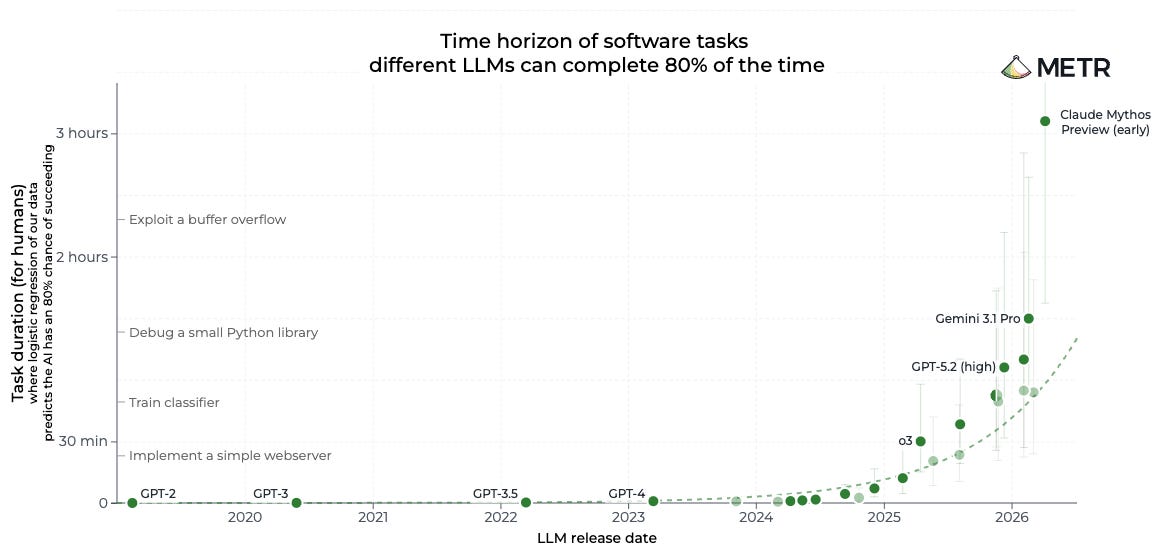
https://metr.org/time-horizons/
This does not mean agents are faster than humans. METR defines the time horizon as the length of task measured by how long a human expert would take, not how long the AI spends running. The point for design systems is simpler: as agents take on longer tasks, they need more context, more tool calls, and more chances to retrieve the wrong memory.
So context quality matters.
If the agent has to rediscover the same decision in every session, you pay for that rediscovery every time. If it asks the wrong person, reads the wrong file, or misses the support ticket that explains the pattern, you pay again. If a designer, engineer, PM, researcher, accessibility specialist, or support lead holds part of the answer but their knowledge is not in the corpus, the agent works with a partial map.
Partial context creates expensive confidence. The goal is not to feed the agent everything. The goal is to make the right team memory retrievable before the agent starts acting.
The visible 10 percent and the invisible 90
Open your design system right now. The agent-readable surface is bigger than you think.
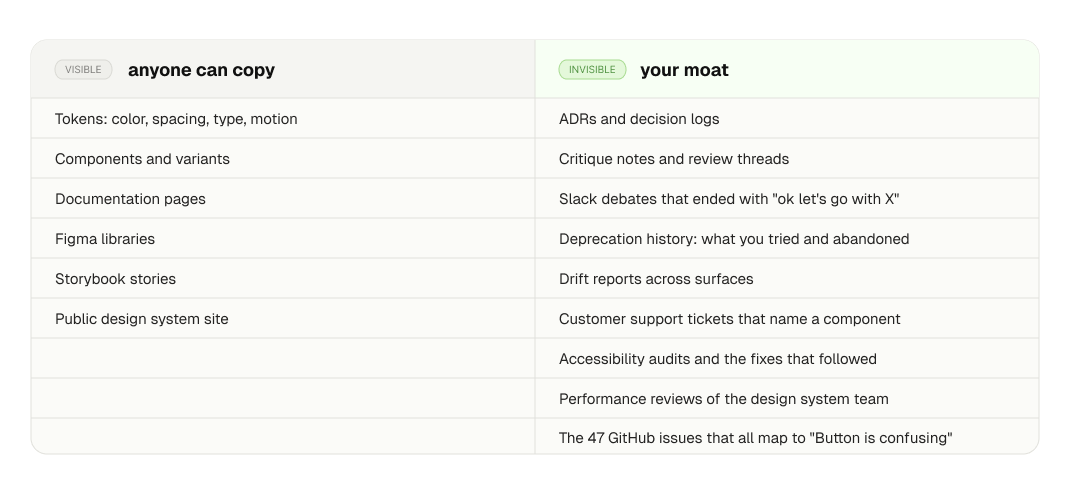
The right column is the moat. Anyone can fork your token JSON. Nobody can fork why you made the decisions inside it.
This is the part I was ignoring. I had built tooling against the left column and assumed that was enough.
The moat does not exist on day one
The important part is not just data. It is data that improves over time.
Design systems have two phases, and the data flywheel works differently in each.
0 to 1: founding phase
The job is to make it work and prove it matters. Scrappy. A handful of high-impact components. Naming conventions still fluid. Adoption inside one team. The job is to ship the system, not to feed an agent. The data you generate is mostly throwaway, things like “the team tried X, it broke, then tried Y.” That is fine.
1 to 100: scaling phase
Make it last and make it scale. Solidified architecture. Rules over examples. Multiple brands, platforms, markets. Now you have:
Three years of token renames with reasons attached
A dozen deprecated components and the threads explaining why
Governance trade-offs and the conversations that produced them
Drift reports across surfaces and brands
Critique notes that surface the same blind spots over and over
Performance reviews of the design system team itself
This is the data most 1 to 100 design system teams already have. Almost none of them feed it to their agents. Most 1 to 100 teams already have this memory. They just have not made it retrievable.
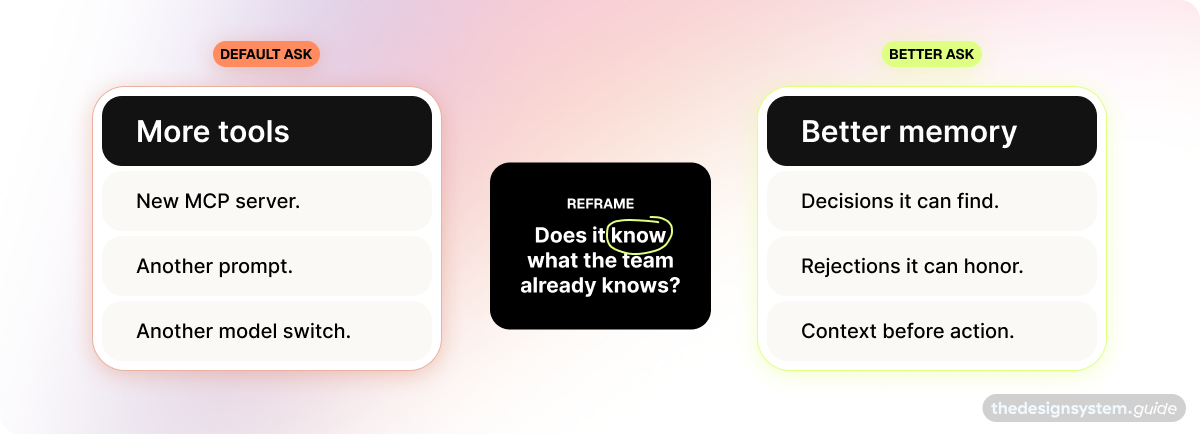
A pile of files is not enough
The naive fix is “dump everything into a folder, point Claude at it, hope.” I tried it. It does not work well enough.
The agent can read individual files. It cannot reason across them. Ask “what changed about Alert this year and why?” and you get a polite shrug, because the answer lives across a Figma comment, a Slack thread, a closed PR, and an ADR that nobody linked together.
QMD tests whether the pile has signal. The graph is what you build once you know it does.
QMD is a local search tool by Tobi Lutke that lets an agent search your own folders with keyword search, vector search, and reranking.
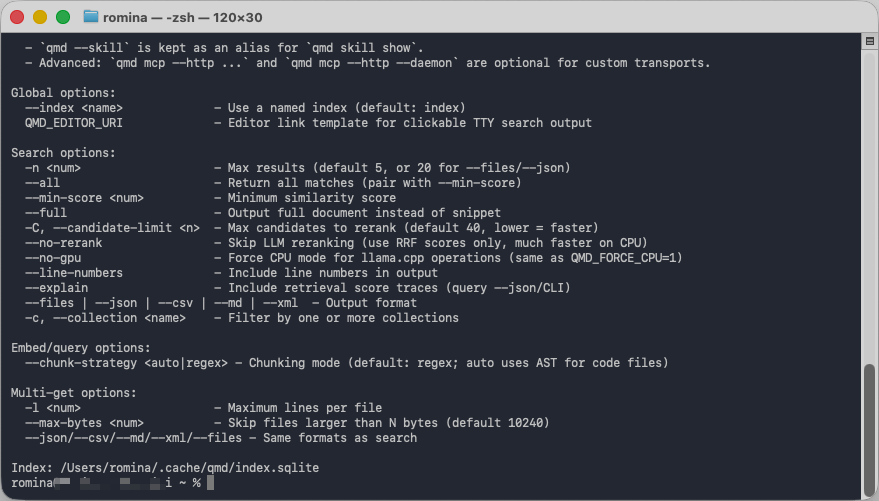
It is the lightweight version I used first. It does not turn your design system into a graph. It gives you a local hybrid index over your files, which is enough to start testing whether your corpus has signal.
The mature design system version is a graph. Tokens connect to components. Components connect to decisions. Decisions connect to outcomes. Outcomes connect back to tokens. The agent walks the graph instead of grepping the pile.
For a design system, the graph nodes are bigger than files. They are token, component, pattern, decision, owner, surface, brand. The edges are uses, supersedes, depends on, was decided by, drifted from.
This is what I rebuilt Tidy around. Every component knows its variants, its tokens, its owner, its decision history, its drift score. The agent queries the graph and knows, instead of crawling Figma and guessing.
How I tested QMD on my own files
I wanted to know if this actually works on my data, not just in theory.
So I installed QMD on a Tuesday and pointed it at six folders:
Tidy decisions
Client design system specs
My Substack drafts
Customer research
IDS talk material
Granola meeting transcripts
It embedded 1,511 of my documents locally in about 5 minutes.
That part matters. I did not want a huge knowledge management project. I wanted the smallest test that could tell me whether my own corpus was useful. It combines keyword search, vector search, and reranking, then returns the files most likely to help the agent answer the prompt. It works because it is a better first pass than asking the agent to crawl a random folder and hope.
The setup was simple:
Pick a folder with real signal.
Add it as a QMD collection.
Embed it locally.
Query it before the agent answers.
Inject the top results as context.
That pattern helps a design system because the system’s value lives across decisions, specs, critiques, and usage history.
It also helps a product.
A product team has the same problem in a different shape. The answer to “why does checkout work this way?” may live across research notes, support tickets, experiment docs, pricing decisions, analytics writeups, and a half-forgotten launch memo. If the agent only sees the current UI, it will confidently suggest the thing the team already tried.
The goal is not to make the agent read everything, but to make it retrieve the right context before it starts acting.
Then I ran three queries that map to real design system work.
Query 1: “why did I choose certain naming conventions for tokens”
Query 2: “what have I written about agentic design system governance”
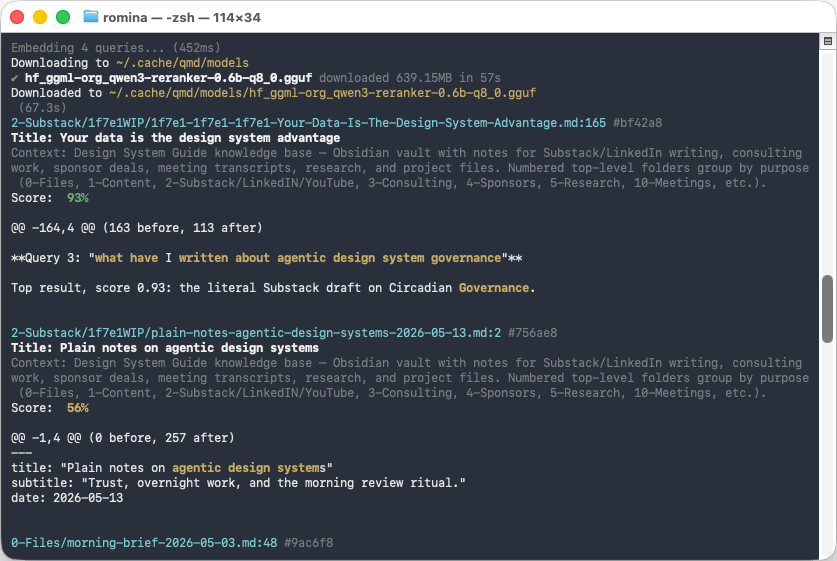
The hybrid pipeline (BM25 + vector + LLM rerank) connected “agentic governance” to “shared practice with developing consciousness.” It pulled a file I had categorized in my head as “philosophy” back into the bucket of “things I have written about how agents should behave.”
This is where QMD earned its keep on this corpus. Pure keyword search would never have surfaced that file. Hybrid retrieval did.
Good data not only makes agents more accurate, it changes what you have to repeat.
The agent layer is the smallest part
This is the order most teams have backwards. They start with the agent. They should start with the data.
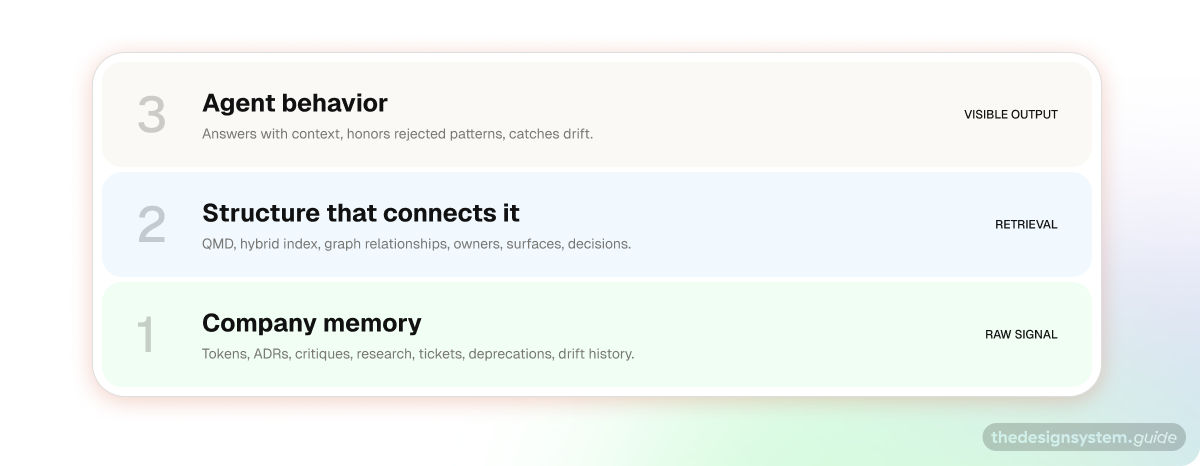
There are three layers, and they have to come in order.
Your data sits at the bottom. Tokens, decisions, drift, critiques, ADRs, and deprecation history. Everything in the invisible column from the table above.
Your structure sits on top of the data. A graph or hybrid index that lets an agent reason across it, not just search it.
Your agent sits on top of the structure. It is the smallest layer, mostly orchestration on top of the first two.
Skip layer one, and the agent generates plausible nonsense. Skip layer two and the agent finds a file but cannot connect it to anything. Nail one and two and the agent layer is almost trivial. You can swap models freely.
This is also why “the team will switch to a better model later” is the wrong worry. Models get cheaper and more capable on someone else’s roadmap. Your data does not show up on its own.
What to do this week
If you are in the 1 to 100 phase and want to start, this is the smallest useful version.
Pick one folder that already has a good signal. ADRs, design critique notes, component specs, research summaries, or support tickets.
Install and index it with QMD:
npm install -g @tobilu/qmd, add the folder as a collection, then runqmd embed.
npm install -g @tobilu/qmd
qmd collection add ~/design-system/decisions --name decisions
qmd embed
Run five real questions against it, using questions your team actually asks instead of demo questions.
Look at the misses. A miss means one of two things: the document is missing, or the document exists but the language is too vague to retrieve.
Write the missing decisions down. Start with the ones you are tired of explaining.
Add retrieval to the agent. Call
qmd querydirectly through your agent’s shell tool, or add a pre-prompt hook that injects the top results as context.
You will know it is working when the agent stops asking you obvious things and starts reminding you of decisions you forgot you made.
Start with the invisible column. Decisions, critiques, drift, rejections. Make one folder searchable and ask real questions.
QMD is only the first step. It tells you whether your corpus has signal.
Next week, I want to go one layer deeper: data labeling. Once you know which memories matter, the next question is how to label them so agents can use them reliably.
The design system is no longer the deliverable. It is the dataset.
What part of your invisible column would you wire in first? Let me know below 😊
Enjoy exploring 🙌
Romina
Explore on your own
🔗 QMD by Tobi Lütke (GitHub). Local hybrid search exposed as MCP.
🔗 Why Tobi Lütke built QMD (Gamgee). Background on the tool’s reasoning.
🔗 How to Build for AI Agents and a Claude Code Second Brain in 25 Min, Peter Yang. Useful context on using QMD with Claude Code.
🔗 Microsoft starts canceling Claude Code licenses, The Verge. Reporting on Microsoft moving engineers from Claude Code to Copilot CLI.
🔗 Uber CTO AI budget coverage, Techmeme / The Information. Summary of reporting on Uber’s AI coding budget overrun.
🔗 AI can cost more than human workers now, Axios. Source for Bryan Catanzaro’s compute-cost quote.
🔗 Gartner inference cost forecast. Forecast on token cost decline and higher agentic token demand.
🔗 Goldman Sachs token demand coverage, PYMNTS. Reporting on Goldman Sachs’ forecast for agentic AI token consumption.
🔗 Time Horizon 1.1, METR. Source for the updated task-completion time horizon data.
— If you enjoyed this post, please tap the Like button below 💛 This helps me see what you want to read. Thank you.
💎 Community Gems
Figma Variables for Complex Multi-Brand Systems by Veronica Campana
Standard tutorials about variables often fall short when it comes to the technical intricacies of enterprise design systems. Drawing from my work building the Index Design System for Dow Jones, this article details the layered variable architecture we developed to manage high-level complexity without sacrificing the designer experience.
🔗 Link