


👋 Get weekly insights, tools, and templates to help you build and scale design systems. More: Design Tokens Mastery Course / YouTube / My Linkedin
You’re watching another “build a design system in 4 hours” video and asking yourself: “Hoooooow?!” and thinking you’ll finally solve your component chaos.
I get it.
But here’s what the video doesn’t show:
Three different button implementations across your codebase (plus more in Angular, Vue, and legacy jQuery)
Developers asking “which token do I use?” (spacing, color, shadow... pick your confusion)
The design system team of one, drowning in maintenance requests
Leadership eventually seeing “why does our app look exactly like every other startup?”
This isn’t a design system. This is expensive copy-paste with extra steps.
I know what you’re thinking: “AI changes everything. We don’t need design system teams anymore.”
Let me show you why that’s only half true.
What changed in the last year(s)
Shadcn made component libraries free. Then came Radix, Ark UI, Park UI, and dozens more. AI made customization instant. Every startup can “build a design system in 4 hours.”
The narrative became: “You don’t need a design system team anymore.”
And they’re right until the codebase grows and customization takes up all your time.
Here’s what happens next:
Initial setup: Fast ✅
Customization: Much longer than expected
Answering “which variant?” questions: Ongoing forever
Fixing things when Shadcn breaks: Ongoing forever
Still cheaper than traditional design systems. But not free.
The trap you can fall into
This is where you can make expensive mistakes.
Startup reality:
10 developers
One codebase
Modern stack
Can break things and move fast
Enterprise reality:
500 developers
12 codebases (React, Angular, new Next.js projects)
Compliance requirements
Cannot break things
Shadcn solves React. What about the other 60%?
Migration costs often exceed custom build costs by 3-5x when you have legacy systems. You’re not just migrating code. You’re retraining teams, updating tooling, managing parallel systems during transition, and dealing with breaking changes across multiple products.
From tools to taste
When you can buy a UI kit for $300 (or less) or copy Shadcn for free, leadership asks: “Why do we need a design system team?”
The answer most teams give is wrong. They say: “To build components faster.” But AI builds components faster than any team.
When software becomes cheap to create, the value shifts to problems that require deep context, taste, and ongoing stewardship. You just can’t buy judgment about what deserves to exist. That’s irreplaceable.
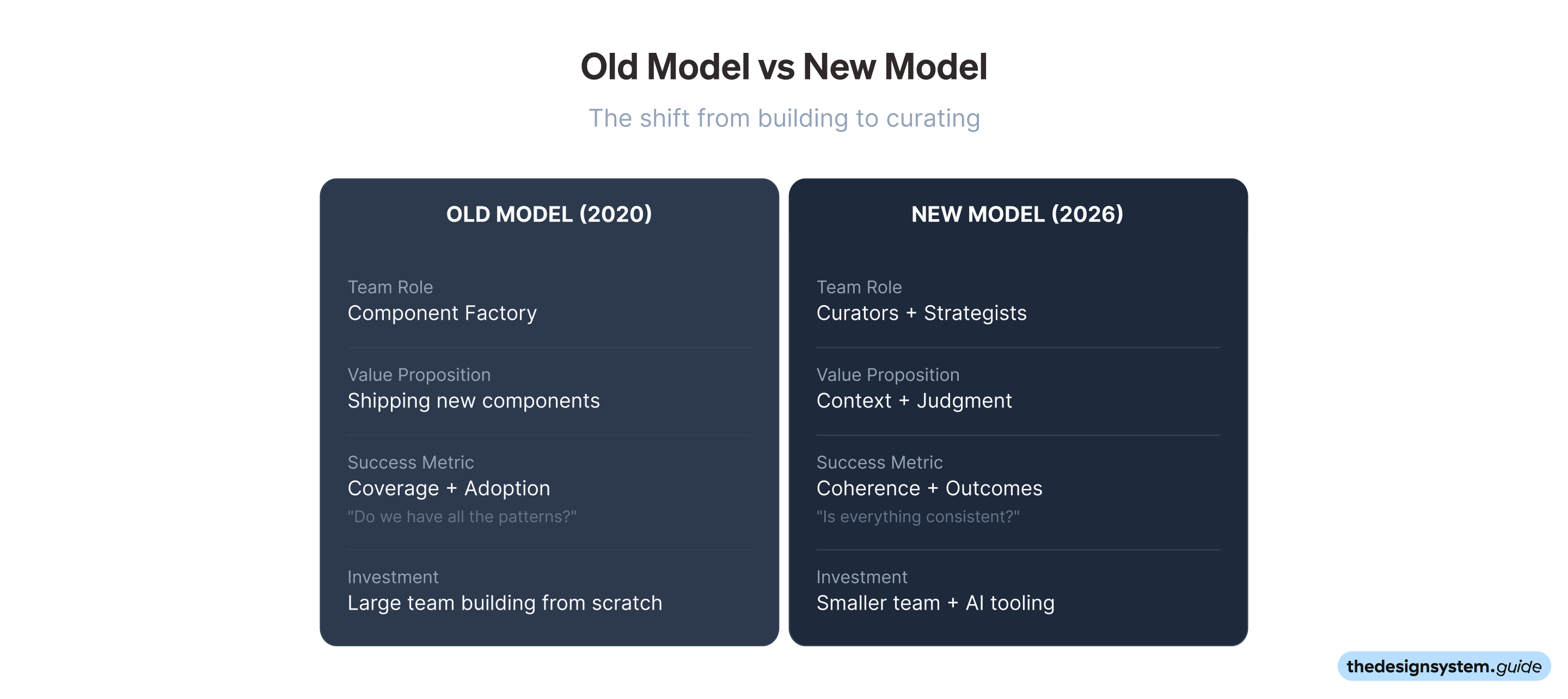
Old model:
Design system team = Component factory
Value = Shipping new components
Success = Coverage+adoption (Do we have all the patterns?)
Investment = Large team building everything from scratch
New model:
Design system team = Curators + Strategists
Value = Context
Success = Coherence (Is everything consistent?)
Investment = Smaller team + AI tooling
The role didn’t disappear. It evolved. And that’s actually good news if you’re willing to adapt.
AI amplifies what you already know. If you understand what makes a good pattern, AI helps you implement it 10x faster. If you don’t have that foundation, AI just helps you create garbage faster.
The data advantage
When everyone can generate a button in 30 seconds, the button has “no value”. The context for WHY you need this specific button is priceless.
Most design systems track adoption. That’s table stakes. The real advantage comes from capturing the context that’s invisible by default and compounds over time.
1. Usage data tells you what’s actually happening.
Which components get used? Which gets ignored?
How are they connected together? (The patterns that work best often emerge from real usage, not planning.)
Where do people struggle? What gets copy/pasted instead of imported?
2. Decision history tells you why things exist.
Why did we choose this pattern over alternatives?
What did we try that failed?
When should we sunset this?
Without this, every new team member asks the same questions. Every redesign starts from scratch. You lose years of learning.
3. Taste and curation tells you what deserves to stay.
What’s been validated enough to standardize?
What’s redundant and needs to be removed?
What’s good enough to keep vs. what’s just legacy?
These three layers build on each other. Usage data informs decisions. Decisions shape curation. Curation improves usage. It’s a flywheel, but only if you’re capturing it.
Companies with this infrastructure will make better decisions 10x faster. The teams treating design systems like static libraries will drown in technical debt they can’t even see.
Making your system AI-readable
You’ve probably blamed the model when AI generates garbage. But the model isn’t the problem. Your context is.
Context is everything the AI sees when you ask it something. Your prompt, yes. But also the system instructions, previous messages, files it can access, and metadata. All of it.
And here’s the catch: AI tools have limited memory. Claude Code technically supports 200k tokens, but by the time you account for system prompts and tool definitions, you’re working with maybe 120k. Fill that up with noise, and the output quality tanks.
So the question becomes: what deserves to be in that limited space?
For design and design systems, I’ve found four things matter:
1. A project context file. Call it CLAUDE.md or whatever. Put it at the root. Tell the AI how your system works: naming conventions, component patterns, token structure, key decisions. This is the single highest-impact thing you can do.
2. Decisions in plain text. Not buried in Confluence. Not hidden in Figma comments. In markdown that AI can actually read. “We chose X over Y because Z.” Simple.
3. Lean documentation. Not 50 pages of Storybook stories. A clear reference that fits in context and answers the questions developers actually ask.
4. Tokens with intent. Not just color-primary: #0066FF. Explain why that color exists and when to use it. The AI needs the “why” to make good choices.
The goal? Anthropic calls it “the smallest possible set of high-signal tokens.”
Soooo, if your components keep coming out wrong, don’t switch models. Fix your context first.
The governance problem
AI makes creating components trivial. AI also makes creating BAD components trivial at scale.
Technical governance (solvable by AI):
Linting rules ✅
Type checking ✅
Automated tests ✅
Human governance (still unsolved):
Who decides when to add a new variant?
How do we prevent “button-primary-new-final-v3”?
What’s the process for breaking changes?
Who has taste?
When creation is free, curation becomes priceless. The bottleneck isn’t “can we build this?” anymore. It’s “should this exist?” That question requires taste, context, and the courage to kill things. AI doesn’t have opinions. You do.
Cost of bad governance:
Small company: Technical debt, slower velocity
Enterprise: Massive duplicate work across teams
You can generate components quickly. You need years to build the taste, context, and governance.
Things are moving so fast that there are no books about new UX patterns. AI interactions, voice interfaces, spatial computing. We’re inventing the rules as we go. There’s no “Design Patterns” book for conversational U or best practices for AI-assisted workflows.
This means creating new ways of interacting requires more iterations than ever to build something genuinely useful. You can’t copy what worked before because “before” doesn’t exist for these patterns. You have to experiment, fail, learn, and iterate. Repeatedly. Until you discover what actually works.
The learning curve illusion
“Shadcn has a lower learning curve than traditional design systems.”
This is technically true, but strategically? Not so much.
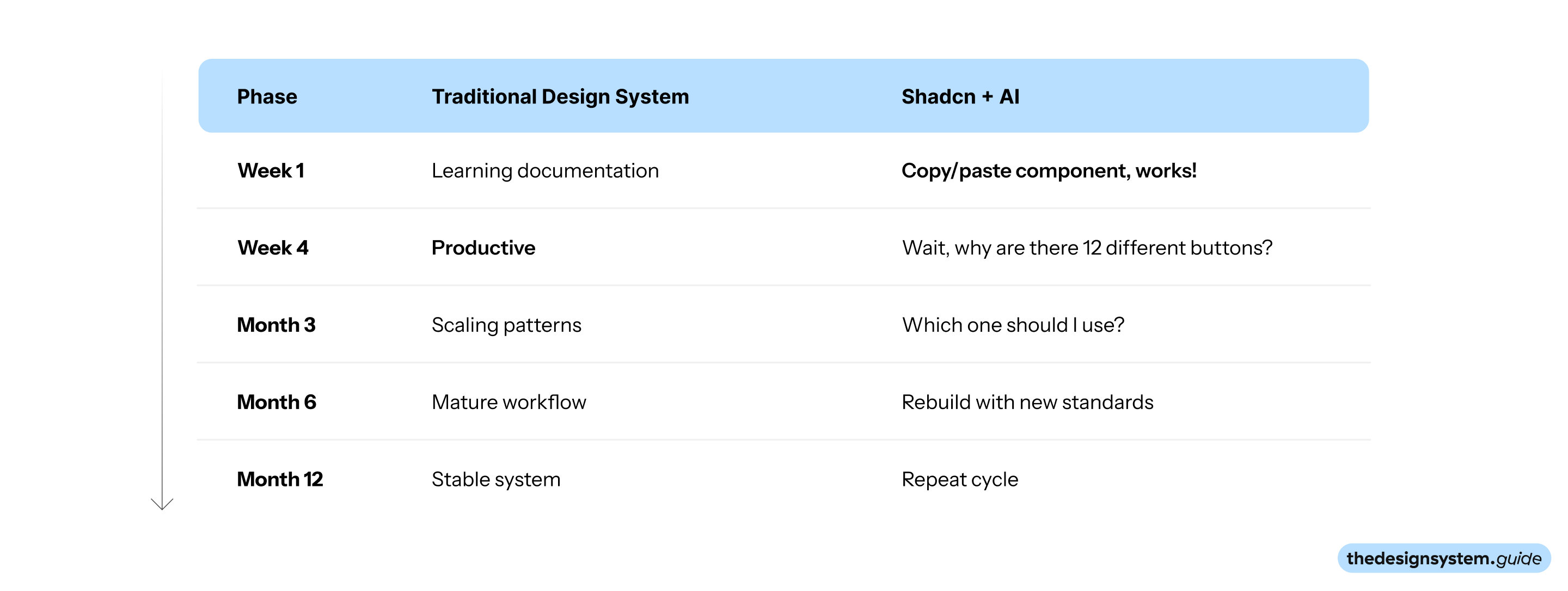
❌ Before: Clear learning curve, high initial cost
✅ After: Fast start, expensive long-term maintenance
Lower initial learning curve ≠ Lower total learning cost.
You’re just deferring the learning to a more expensive phase.
What design system teams should actually do in 2026
Old job:
Build React components
Write Storybook documentation
Fix component bugs
Ship 2-3 components per quarter
New job (2026): Design System Lead
One person (or small team) with three responsibilities:
Curation:
Kill more patterns than you create. Use AI to generate, humans to judge. Ask “should this exist?” constantly.
Context:
Capture tribal knowledge before people leave. Translate the system into AI-readable formats. Maintain the “why” behind every decision.
Quality:
Track analytics on every component. Define “good enough” with data. Sunset bad patterns aggressively.
This isn’t a solo effort. Design systems require constant collaboration:
Product teams need to understand business goals
Designers and developers need to be in sync
Stakeholders need to trust the system
Leadership needs to see the value
You’re not just building software. You’re building organizational muscle memory about what good looks like.
My actual recommendations
Startup (<100 people)
Setup: Days, not months
✅ Use Shadcn/Radix + Tailwind
✅ Use AI for customization
✅ Assign someone to own consistency (part-time is fine)
✅ Track usage data from day one
✅ Document decisions in markdown (AI-readable)
✅ Accept you’ll rebuild every few years
❌ Build from scratch
❌ Hire a dedicated design system team
❌ Create perfect UI kit in Figma before product-market fit
The goal: Stay lightweight. Don’t over-engineer. Test what works.
Mid-size (100-500 people)
Setup: A few months
✅ Start with Shadcn for new projects
✅ Connect old and new with Web Components (see below)
✅ Dedicate someone to stewardship (not creation)
✅ Invest in analytics
✅ Use AI for generation, humans for curation
❌ Try to migrate everything at once
❌ Rewrite legacy code from scratch
❌ Build a massive team
❌ Copy enterprise approaches
Mapping old + new components
You have two paths for legacy components:
Option A:
Wrap it. Use Web Components to wrap legacy code. They work across React, Angular, Vue, and jQuery. Teams keep their existing APIs. The system modernizes underneath. Lower risk, slower progress.
Option B:
Regenerate it. Use AI to analyze legacy components and generate new components that match your target system. Feed AI the component code plus usage examples from your codebase. Validate the output. Replace the imports. Faster progress requires thorough testing.
Most mid-size companies do both: wrap the complex/risky stuff, regenerate the simple/well-tested stuff.
The goal: Bridge old and new without burning everything down.
Enterprise (500+ people)
Setup: Depends on your legacy!
✅ Custom design system is still worth it
✅ Small team focused on curation (not building)
✅ Invest more in governance than components
✅ Use AI for generation, not strategy
✅ Build data infrastructure around your system
✅ Measure outcomes, not adoption
✅ Use Web Components as the universal layer across all frameworks
❌ Try to move everyone to Shadcn
❌ Build components without usage data
❌ Measure adoption as success
Why Web Components make even more sense at scale:
Enterprise has the hardest legacy problem: React 2019, Angular 2017, Vue, jQuery, and whatever new framework the next acquisition brings. Web Components work everywhere. Build once, deploy across all frameworks. No more maintaining 4 versions of the same button.
The bridge strategy from mid-size applies here too, just on a larger scale. Wrap the legacy systems that are too risky to touch. Regenerate the simpler components with AI. Gradually consolidate.
ROI: Track how much time developers spend duplicating UI work. Even a conservative estimate shows the cost of inconsistency far exceeds the investment in a design system team.
Start with the right question
✨ “What problem are you actually solving?” ✨
“We need a starting point for components.”
→ Pick any library (Shadcn, Radix, whatever). But assign someone to own consistency from day one.
“We have 500 developers building duplicate UIs.”
→ Build a system. Hire a Design System Lead.
“We don’t know which patterns actually work.”
→ Invest in analytics.
“AI generates garbage code that doesn’t match our system.”
→ Make your system AI-readable. Then use AI.
“We can’t ship fast enough.”
→ Your problem isn’t just the design system. 🫢
What to do this week
You don’t need to build a design system right now. Start by building the infrastructure to know if you need one. Here’s a practical path:
Step 1: Set up analytics (Day 1-2)
Track component usage
Measure user outcomes
Identify duplicate patterns
Step 2: Document decisions (Day 3-4)
Create CLAUDE.md with context
Make decisions AI-readable
Capture the “why” behind every choice
Step 3: Test with AI (Day 5)
Generate one component with AI
See if it matches your standards.
Identify gaps in your system’s clarity
Step 4: Make one decision (End of week)
Should you:
Build a system?
Use Shadcn?
Invest in curation?
Invest in agentic XY?
Base it on your data, not industry trends. Trust what you’re learning from your own context.
In short
Design systems in 2026 aren’t about components. They’re about CONTEXT.
Software is cheap to build.
Context is expensive to maintain.
Components are free.
Taste is priceless.
AI can generate anything.
Only humans know what deserves to exist (so start building taste).
The teams that understand this will build better products faster. The teams that don’t will spend hundreds on infrastructure that nobody uses.
And if you’re reading this, asking these questions, thinking critically about the path forward? You’re exactly the kind of person who will figure it out. 🙌
Enjoy the process 😊, Romina
— If you enjoyed this post, please tap the Like button below 💛 This helps me see what you want to read. Thank you.
💎 Community Gems
The Rise of the Model Designer
Interview with Barron Webster (Figma)
🔗 Link
This is top shelf stuff Romina, thanks so much! I was wondering, in terms of tracking and measuring (the Day 2 stuff) is there a set of what to track, what/how to measure that you'd recommend as a reference?
I'd assume some of this is based on the context of the business and the state/condition of the application and design system being measured, but it's a bit of a murky area for me and any clarity you can bring would be really welcome 🙏
Thank you for this thorough explanation.
You mentioned that humans still decide when to add a new variant. I'm curious couldn't you use context to solve for this? Maybe a skill that has rules for when to create a new variant vs a prop vs a whole new component?