👋 Get weekly insights, tools, and templates to help you build and scale design systems. More: AI Design Guide (NEW) / Design Tokens Mastery Course / YouTube / My Linkedin
I spent the last six months running an AI agent inside a 30,000-node Figma file. I can now tell you which jobs it earns.
Tidy is the Figma plugin and MCP server I built for design system work. It exposes 105 tools to Claude Code: audits, variable CRUD, dependency graphs, screenshots, and a raw execute tool that runs arbitrary Plugin API code in the live file. On paper that sounds like a toybox. In practice, a client engagement decides fast which tools matter, because a real migration punishes everything that wastes your time.
I tried to visualize how I see my superpowers agent Tidy 😅

Ok, let’s move to ten workflows, and for each one, how to run it on your own file.
Delete a token family and prove nothing broke
Deleting tokens is where maintainers freeze, because Figma gives you no “who uses this” answer at deletion time, and a careless delete leaves broken aliases you find weeks later.
I retired a legacy background family of about two dozen tokens behind the gate below, zero tombstones left behind (a tombstone is an alias or binding that still points at a variable that no longer exists). An earlier, pre-agent deletion in the same engagement left dozens of them, and cleaning that up cost a session.
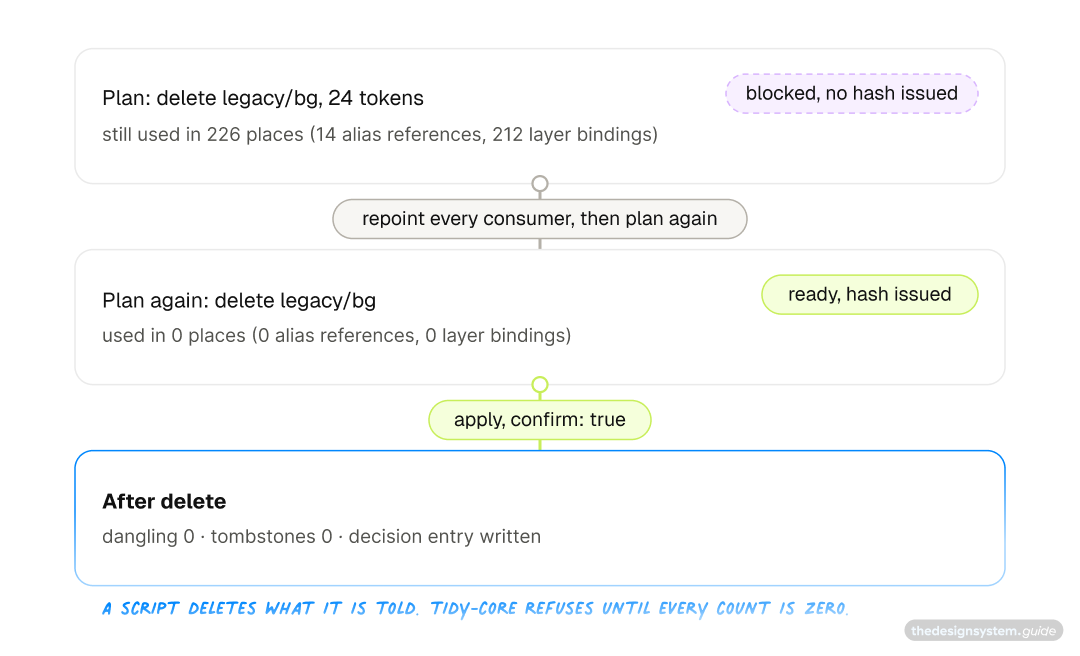
This is the workflow I would not run on a plain script, and the reason the open source tidy-core (basic version of the Tidy) exists, so it goes first. Figma’s own MCP server reads variables and cannot delete one. The Plugin API deletes a variable that is still in use without a check: the layers keep painting the last value, the aliases that pointed at it become tombstones, nothing on the canvas looks wrong, and the token export breaks weeks later. A script the agent writes will count consumers first if you asked it to, differently each time, and one day you will not ask. tidy-core cannot issue a hash for a delete while a consumer remains. The safety is in the tool, not in the prompt.
Plugging it in takes about twenty minutes and no build step. In Claude Code it is one line in the terminal:
claude mcp add tidy-core -s user -- npx -y tidy-coreIn Cursor, Windsurf or Claude Desktop, add the same server to the app’s MCP settings file, which for Cursor is ~/.cursor/mcp.json, then fully quit and reopen the app:
{ "mcpServers": { "tidy-core": { "command": "npx", "args": ["-y", "tidy-core"] } } }The server fetches itself the first time it starts. Figma needs one more piece, a small plugin that lets the server see inside your file. Download the repo as a ZIP, then in Figma Desktop go to Plugins, Development, Import plugin from manifest, and pick plugin/manifest.json from the unzipped folder. By the way, I suggest you put it in the folder where you usually store your “Coding” experiments.
Run it and it finds the server on its own. Ask your assistant “Check tidy status” and it should name the file it is connected to. The repo’s getting-started guide walks the same steps in more detail, for people who have never set up an MCP server.
Now open the library file and ask for the deletion straight out:
Plan deleting every token under legacy/bg. Intent: retire the legacy background family, replaced by color/background.
It comes back blocked. No hash, one line per token, and the counts are read from the live file:
{
  "status": "blocked",
  "planHash": null,
  "estimatedBudget": { "aliasReferences": 14, "nodeBindings": 212, "bindingsExact": true },
  "risks": [
    { "level": "blocking", "message": "\"legacy/bg/default\" is still used in 31 places (2 alias references, 29 layer bindings). Deleting it breaks them. Repoint them first with aliasVariable." }
  ],
  "nextStep": "This plan cannot be applied. Resolve the blocking risks above and build a new plan. No hash was issued."
}
That refusal is the whole product. The blocked list is also your migration to-do, token by token. Alias references you repoint with tidy-core itself, one plan per consumer, value-preserving so nothing shifts:
Point every token that aliases legacy/bg/default at color/background/default, in both modes.
Layer bindings are node-level, which is not one of the six operations, so those move with the count-and-rebind snippet in the next section, or with any bridge that runs Plugin API code. Then plan the delete again. The counts come back from the file as it is now, not as it was:
{ "status": "ready", "planHash": "3f9c2a1b04e7...", "estimatedBudget": { "aliasReferences": 0, "nodeBindings": 0, "bindingsExact": true }, "risks": [], "nextStep": "To execute: tidy_apply with planHash \"3f9c...\" and confirm: true." }Save a named Figma version yourself, then apply with a reason:
Apply that plan. Legacy background family retired, replacement live since the July restructure.
The intent becomes the subject of a decision entry, that sentence becomes its rationale, and the tool writes the entry itself. If anyone touched one of those tokens between plan and apply, it stops and tells you what moved. A plan also expires after an hour, so a review from Tuesday cannot delete on Thursday. The plan that finally got a hash is the receipt: zero tombstones by construction, not by sweep.
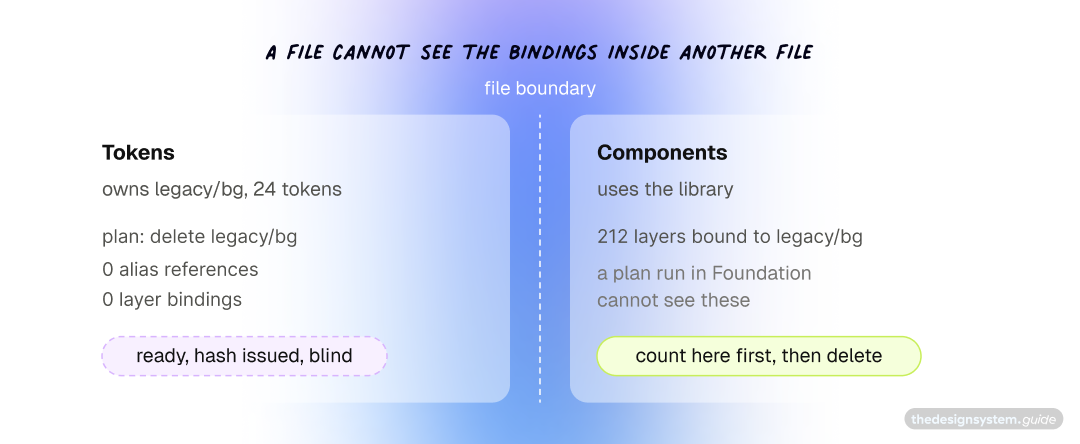
One thing no single-file tool can see, and the case that bites. Your tokens live in a Foundation file and every component that uses them lives in a Components file. Open Foundation, plan the delete of legacy/bg, and the count comes back zero, because those 212 layer bindings are in Components, and a file cannot see the bindings inside another file. tidy-core issues the hash. The delete runs. Every one of those layers keeps painting its last value, and the export breaks a month later. That is the exact shape of the deletion that bit me: verified clean in the foundation file, dozens of tombstones in the components master.
So before you delete from a library, open the file where you have components in Figma. It needs to be a desktop app! Run the plugin there, and count bindings to the library token with the snippet in the next section.
tidy-core cannot do that count for you yet, because a plan only resolves the variables a file owns. It is the one place this gate still needs you.
What the gate enforces, in order, whichever tool you use:
Find everything that still uses the old tokens, in every file that consumes them.
Move each of those onto the replacement token, keeping the same values so nothing shifts visually.
Check that nothing points at the old family anymore: no components, no aliases, no stray bindings. Every count must read zero.
Only then delete.
Sweep once more for broken references, and keep that zero as your receipt.
#2 Repoint thousands of bindings in one session
The client’s component master file had accumulated years of legacy references (I call them ghost variables): tokens from a superseded collection, primitives bound where semantics belonged, renamed tokens that never propagated. Cleaning that by hand means clicking through instances one at a time. Nobody ever finishes that job. It just stops when the person assigned to it burns out.
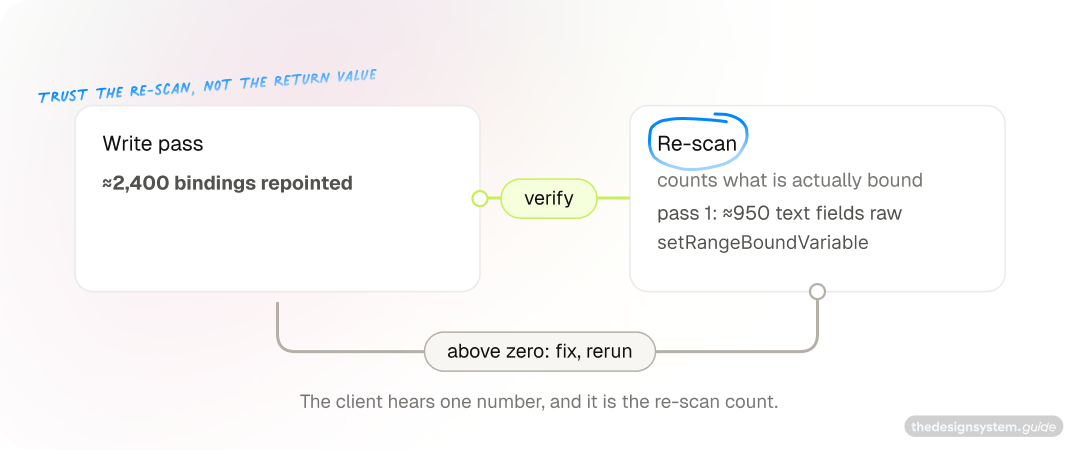
With the MCP connected, the same job is a loop: scan every node, match each stale binding to its current target, rebind, verify. One session repointed about 2,400 bindings with zero errors. A separate sweep earlier that week moved over ten thousand paint bindings off stale cached records. The whole file, not a sample.
Two things made this safe rather than reckless.
I made the agent count bindings, not variables. An early estimate said “a couple dozen direct primitive bindings to fix.” The real number, once the agent counted actual node bindings instead of distinct variables, was over 3,500. If you scope a migration by variable count, you will underestimate the work by two orders of magnitude and blow the budget you promised the client.
I made it verify end state, never trust a zero-error return. Figma’s setBoundVariable silently does nothing on text-node typography fields. It returns no error. It changes nothing. The file had nearly a thousand letter-spacing bindings that a first pass “fixed” without touching, because text nodes need setRangeBoundVariable instead. Since then, every bulk write ends with a re-scan that counts what is actually bound now, and only that count gets reported to the client.
To run this on your file, pick one legacy family, not “everything,” and start with the count:
// count every binding to tokens from a legacy family (here: "legacy/")
const hits = [];
for (const node of figma.currentPage.findAll(() => true)) {
  for (const [prop, b] of Object.entries(node.boundVariables ?? {})) {
    for (const ref of Array.isArray(b) ? b : [b]) {
      if (!ref?.id) continue; // componentProperties nests its aliases one level deeper
      const v = await figma.variables.getVariableByIdAsync(ref.id);
      if (v?.name.startsWith("legacy/")) hits.push({ node: node.name, prop, token: v.name });
    }
  }
}
console.log(hits.length, hits.slice(0, 20));
That number is your real scope. Write the old-to-new mapping as a table, get it approved, checkpoint, let the agent run the rebind loop, then run this same count again. The migration is done when it prints zero, and not before.
#3 Extra themes in the picker mean a stale import record
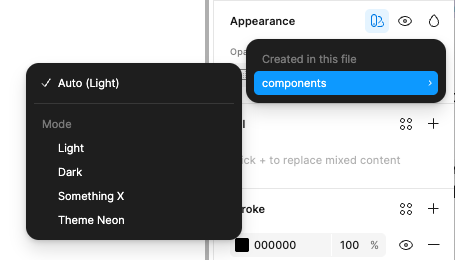
This one is my favorite, because no amount of clicking would have solved it.
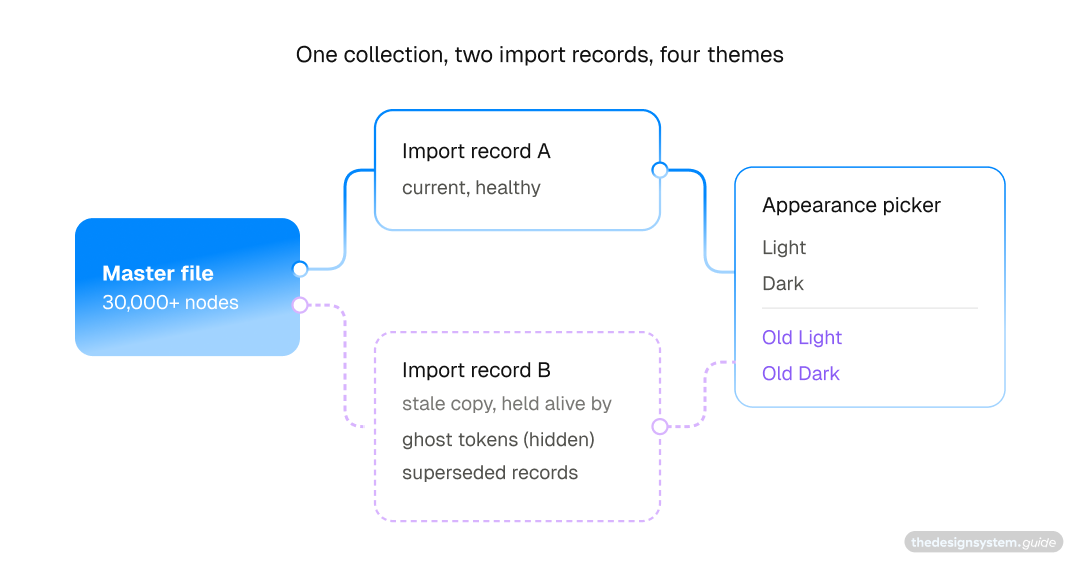
You switch a frame’s appearance and the picker offers more themes than your system has: Light, Dark, and then some extra themes. Nobody on the team ever created a theme called “Theme Neon”. The obvious guess, a duplicate collection, was wrong. The file referenced one collection through two import records (an import record is the file-local copy Figma keeps of a library collection once you have used it), and the second record survived on a handful of invisible anchors.
The agent swept bindings first. Zero stale bindings. Picker still broken. Then explicit mode pins. Fixed nearly a hundred of those. Picker still broken. The real anchors turned out to be things a human cannot see in the UI at all: a handful of ghost tokens flagged hidden-from-publishing but still bound in the file, and two dozen superseded variable records inside the current collection, same name, same collection, older internal id, still aliasing the dead record.
You detect those by re-importing every remote variable by key and comparing ids. If the fresh import comes back with a different id than the one bound in your file, you found a zombie. Collection-level audits report these as clean, because the collection id matches.
Once the last alias anchor died, the extra themes fell out of the picker on their own. The sweep went through node bindings, mode pins, styles, prototype reactions, and cached import records. Five layers, and the bug lived in the fifth. That is the kind of investigation an agent with file-wide read access finishes in an afternoon and a human never starts.
If your picker shows themes nobody created, hunt in this order, cheapest first: node bindings, explicit mode pins, styles, prototype reactions, and only then the cached import records. The first four are ordinary scans your agent can write from this description. The fifth needs the id comparison:
// collect every library variable bound on the page, re-import each by key,
// and flag the ones whose fresh import comes back with a different id
const bound = new Map();
for (const node of figma.currentPage.findAll(() => true)) {
  for (const b of Object.values(node.boundVariables ?? {})) {
    for (const ref of Array.isArray(b) ? b : [b]) {
      if (ref?.id && !bound.has(ref.id)) bound.set(ref.id, await figma.variables.getVariableByIdAsync(ref.id));
    }
  }
}
for (const v of bound.values()) {
  if (!v?.remote) continue;
  const fresh = await figma.variables.importVariableByKeyAsync(v.key);
  if (fresh.id !== v.id) console.log("zombie:", v.name, v.id, "→", fresh.id);
}
Rebind everything the zombie check flags onto the fresh imports, and the extra themes disappear on their own.