


👋 Get weekly insights, tools, and templates to help you build and scale design systems. More: Design Tokens Mastery Course / YouTube / My Linkedin
I have to start this email with amazing news. Almost two weeks ago, I launched the Agentic Design Community + Guide. 🥳✨I rolled it out in batches to everyone on the waiting list. Thank you to everyone who has already sent feedback.
What is inside:
* 87 guides on token pipelines, Figma MCP, Claude Code, and component audits (growing weekly)
* 33 production prompts
* 9 suggested learning paths, including a beginner setup that takes you from zero to a working AI workflow
* 26 templates and checklists
* A directory of 158 real design systems, from Netflix to Porsche
* 40 honest tool comparisons, no affiliate links
* Free tools like the Style Explorer and Trust Levels Playground
* Live sessions
* Free, helpful tools
* and so on
It updates weekly. 🌀
And now to design tokens.
I thought design tokens would be the easiest design system data for AI agents to use.
They are already structured, they already live in JSON, and they already move between Figma and code. So I read the token files of 50 design systems to see how ready they really were.
I found two things I had not expected. They are far more different from each other than I assumed, and most of them tell an agent what a value is without telling it what the value means.
Okay, why this difference matters? A token file can be perfectly valid for a build pipeline and still be thin context for an AI agent. The pipeline needs to turn color.red.500 into a usable value. The agent needs to know whether that red is for danger text, destructive buttons, error borders, alert backgrounds, brand moments, charts, or something that should never be used directly. Those are different jobs.
Readable is not the same as usable
Design system teams have spent years making tokens machine-readable. That was the right step. Agent-ready data just asks for something on top of it. It asks:
What does this token mean?
When should it be used?
When should it not be used?
Is it deprecated?
Which component or state depends on it?
Which decision created it?
Which platform does it map to?
Without that layer, the agent can still read the file. It just has to guess.
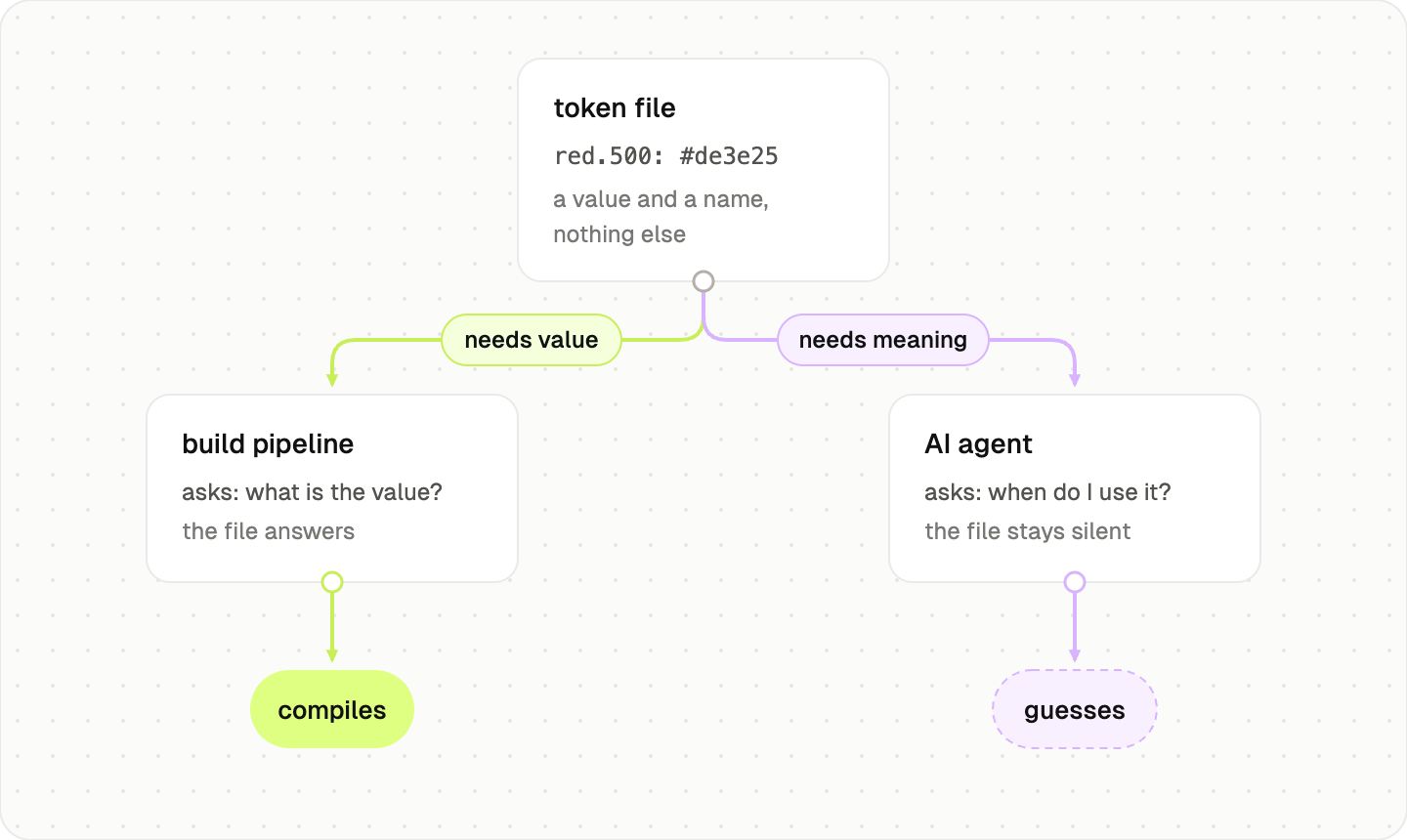
Say an agent needs a danger color. It finds red.500. Nothing in the file says that red means danger, so it might reach for the same red on a disabled button or a decorative chart. The file gave it a value, not a reason.
These files were built to compile, and they compile beautifully. Explaining themselves to an agent is a newer job, and most were designed before that job existed.
How I looked at this
I read the public token files of 50 design systems and then used AI to compare the real source an agent would load, not the polished documentation.
For every system I gathered the same four things:
Where the tokens live, and in what format.
How many tokens there are, by category: color, typography, spacing.
How the tokens are named.
What meaning the file carries.
The same data for all fifty, so the comparison is fair. I counted from the raw files: where a system ships every shade in code, I counted every shade, and where a system keeps spacing in a build script, I went and counted that too.
The full dataset, every system with its format, location, counts, and meaning layer, is published at aidesign.guide/token-audit.
Where the tokens actually live
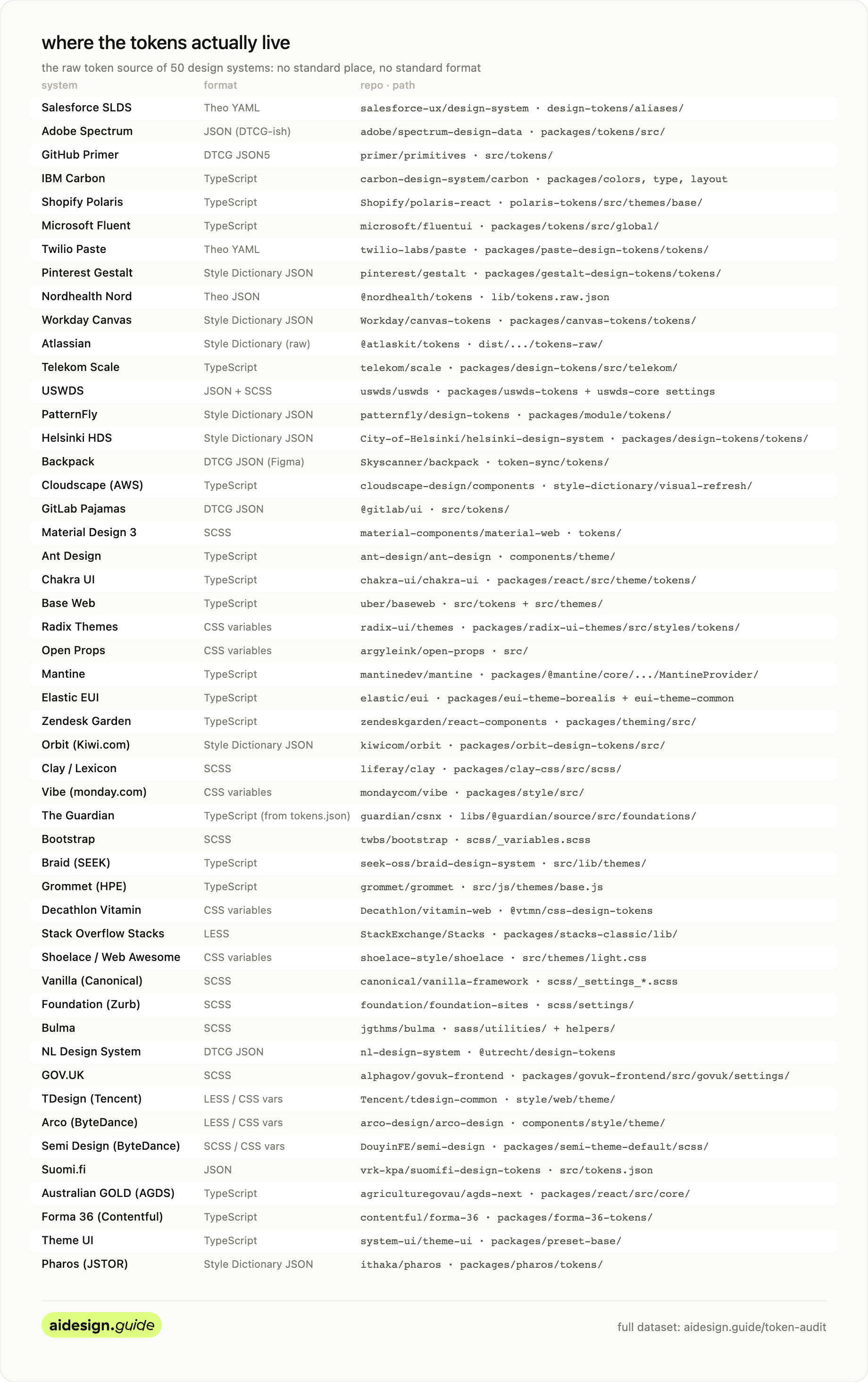
The first thing I learned is that there is no standard place, and no standard format. I found at least eight formats in active use:
DTCG JSON (Primer, GitLab, Backpack, NL Design System)
Style Dictionary JSON (Workday, PatternFly, Gestalt, Orbit, Pharos)
Theo YAML (Salesforce, Twilio, Nord)
Plain JSON (Suomi.fi)
TypeScript objects (Carbon, Polaris, Fluent, Ant, Chakra, Base Web, Cloudscape, Mantine, Elastic, Braid, Grommet, Forma 36, Theme UI, Australian GOLD)
CSS custom properties (Radix, Open Props, Vibe, Shoelace, Decathlon Vitamin)
SCSS maps (Material, Liferay Clay, Bootstrap, Foundation, Bulma, Vanilla, GOV.UK, Semi, parts of USWDS)
LESS or CSS variables compiled from it (Stack Overflow Stacks, TDesign, Arco)
Some live where you would not expect. Adobe moved Spectrum’s tokens to a repo called spectrum-design-data, Shopify keeps the Polaris tokens inside polaris-react, and GitLab ships its tokens inside the @gitlab/ui package.
Knowing where the tokens live is the kind of thing you would tell a new teammate on day one. An agent needs the same pointer. Here is the map.
How big is a design token system
There is no standard size either. But before the numbers, the lens that makes them mean something: every count in this section measures the same thing. How many decisions the system makes for you, versus how many it leaves to you. A small scale is an opinion. A large scale is a palette. Neither is wrong, but each one changes what a consumer of the system, human or agent, has to figure out alone.
Take spacing, the simplest scale.
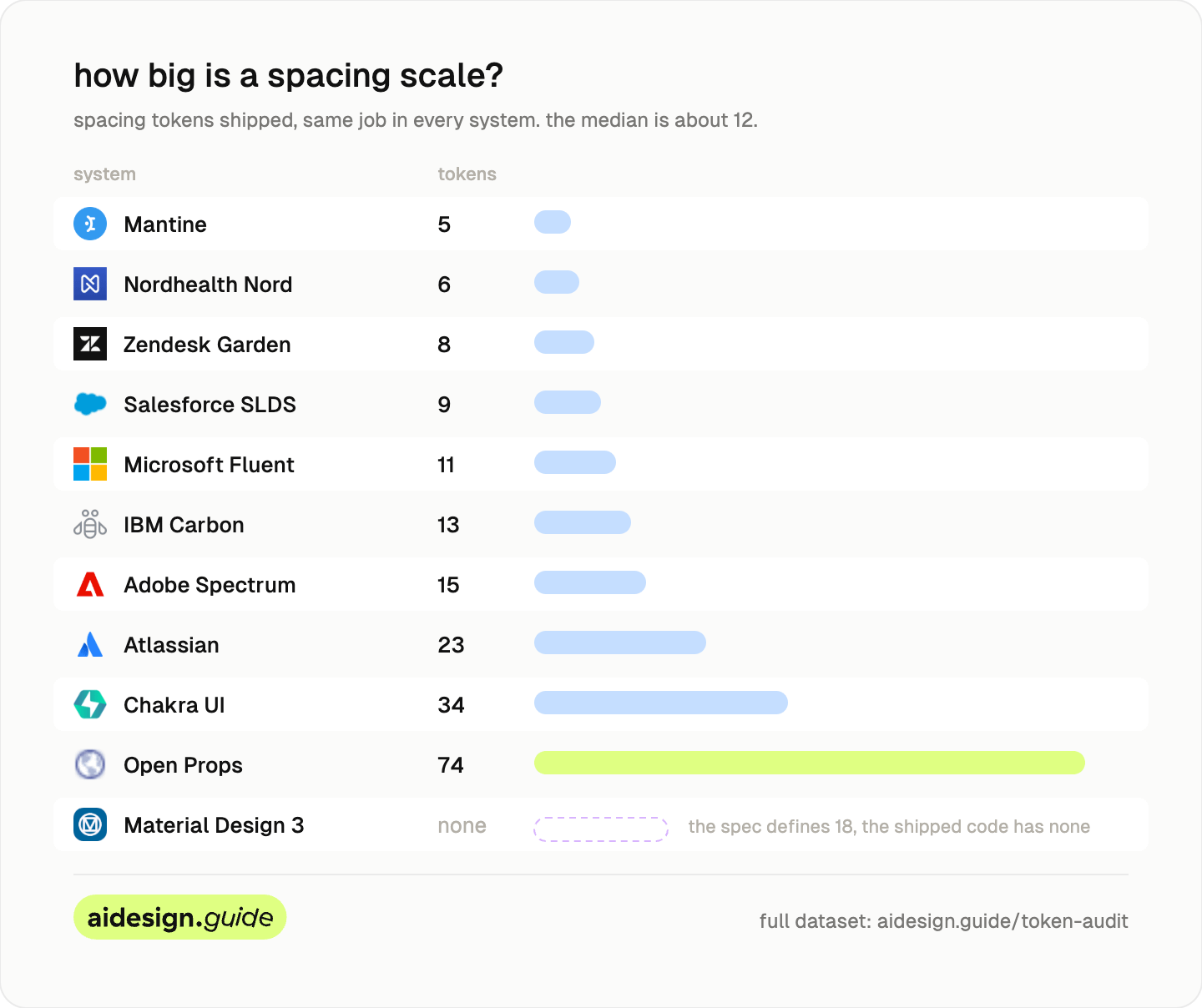
The median is about 12 steps, and most systems land between 8 and 15. Mantine ships 5, Open Props ships 74.
Read those two extremes through the delegation lens. Mantine’s 5 steps mean a designer, a developer, or an agent picking spacing has five options and will be consistent almost by accident. Open Props’ 74 steps mean every gap on every screen is an open decision, and an agent facing 74 unlabeled options is a drift generator. Every step past what you can name and explain is a choice somebody will eventually get wrong. The field’s median of 12 is a usable benchmark: count your spacing tokens, see where you sit, and ask how many of them you could write a usage rule for.
Material Design is the strangest case. The M3 spec defines a full spacing scale, 18 tokens from md.sys.spacing.0 to md.sys.spacing.900, right there on the documentation site. But material-web, the shipped code an agent would actually load, carries none of them: its token folder has sys files for color, elevation, motion, shape, state, and typescale, and no spacing file. The scale exists on paper. In the file, it does not. Which is this post’s whole argument in one system.
Material is not the only one. A whole class of systems does the same, especially component libraries. Tailwind, MUI, Tamagui, Element Plus, Naive UI, and PrimeVue all treat spacing as a base unit times a multiplier, or tie it to component sizes, rather than a list of named steps. It is a common and reasonable pattern. It just is not something an agent can read off the file as tokens.
Now typography. The median system ships about 25 typography tokens, and the range is enormous.
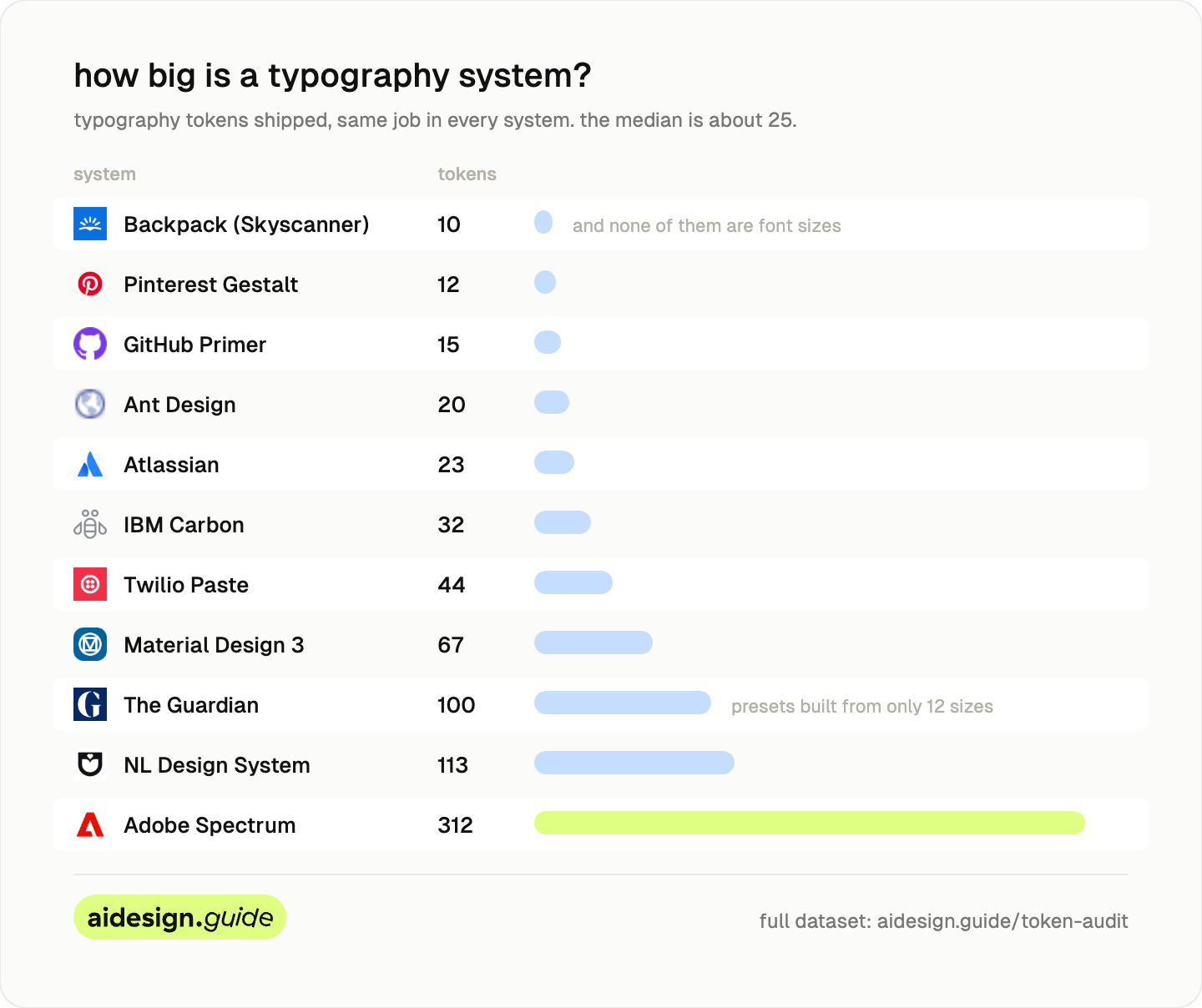
Backpack ships 10, and none of them are font sizes. Its sizes live in compiled code rather than the token file.
Adobe Spectrum ships 312. It splits every type role into size, weight, line height, family, and script, with separate sets for CJK and serif.
The Guardian ships 100, a named preset for nearly every combination of family, weight, style, and size, built from only 12 underlying sizes. The NL Design System ships 113, most of them scoped to a single component.
This is the delegation lens again, sharpest in typography: presets are pre-made decisions, atoms are homework. The Guardian pre-decided every valid combination, so nobody, human or agent, can compose an invalid one; the count is high because the decisions are already made. Spectrum ships the atoms and trusts you to combine them well; the count is high because the decisions are still open. Same number, opposite meaning, which is why the count only makes sense once you ask what it delegates.
Neither approach is wrong. A 312-token system and an 11-token system are answering different questions.
So “a design token system” can mean 10 tokens or 312 for the same job.
Color is the least comparable number (for me), because some systems publish every shade and some publish only the few they use. Theme UI’s starter preset ships 5 and expects you to add your own. Fluent and Radix run past 600.
The number that matters is the semantic layer, the named roles an agent actually reasons over. There, the range is just as wide. Nord exposes 57. Polaris exposes 226. PatternFly exposes 342. Atlassian exposes 391. And it is the same lens one more time: the semantic count is roughly how many UI decisions the system has pre-made and named. That, not the size of the primitive ramp, is the number to compare.
Everyone names the same thing differently
Here is a semantic background color, named eight ways.
Workday:
surface.defaultTwilio:
color-background-strongPolaris:
color-bg-fill-critical-hoverFluent:
colorNeutralForeground1GitLab:
action.primary.background.defaultPatternFly:
global.background.color.primary.defaultCloudscape:
colorBackgroundButtonPrimaryActiveSpectrum:
accent-background-color-default
Here is the primitive, the color blue
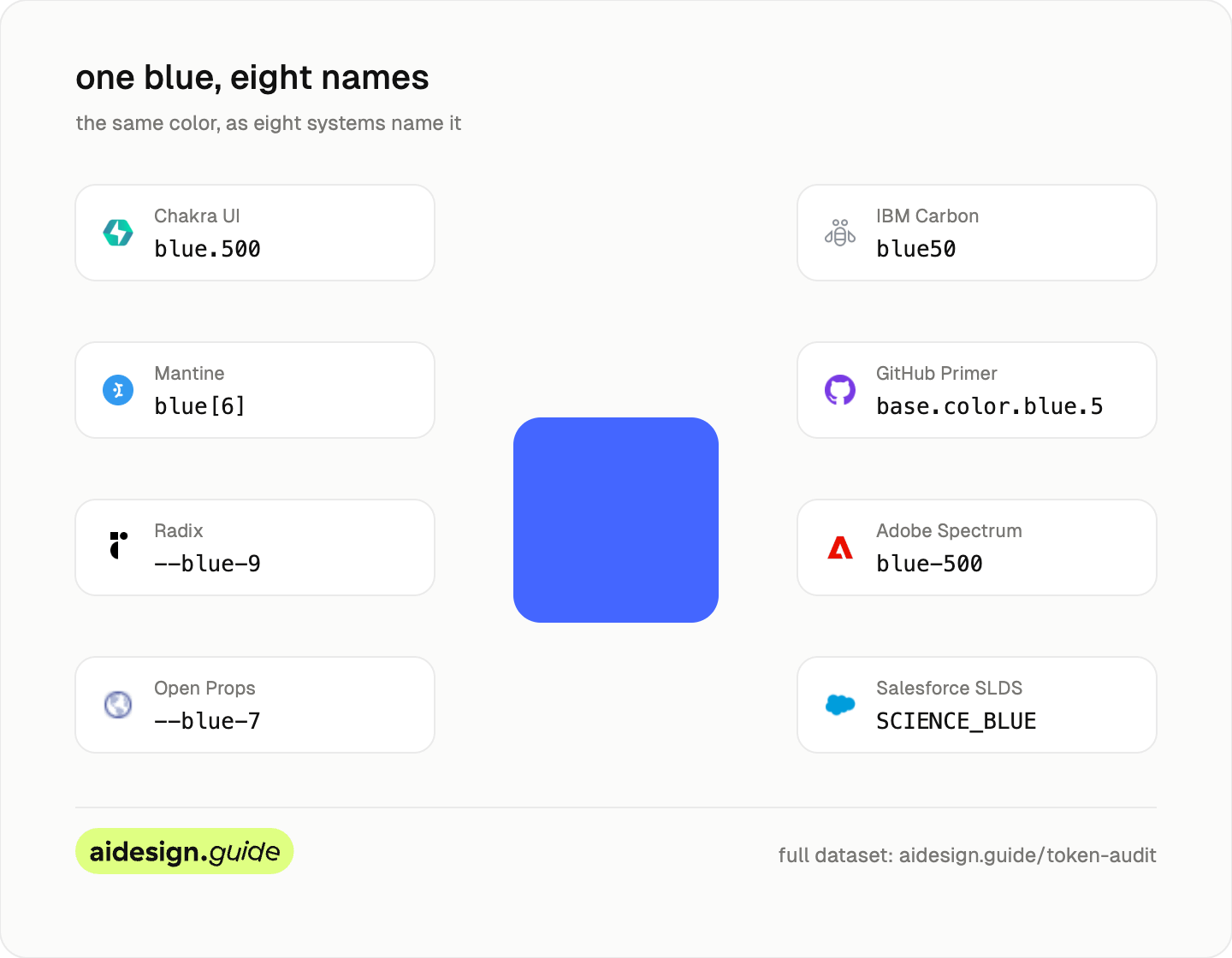
Chakra:
blue.500Mantine:
blue[6]Radix:
--blue-9Open Props:
--blue-7Carbon:
blue50Primer:
base.color.blue.5Spectrum:
blue-500Salesforce:
SCIENCE_BLUE
To see how deep the differences go, put ten systems side by side. These are real tokens from the raw files, and no two share a grammar:
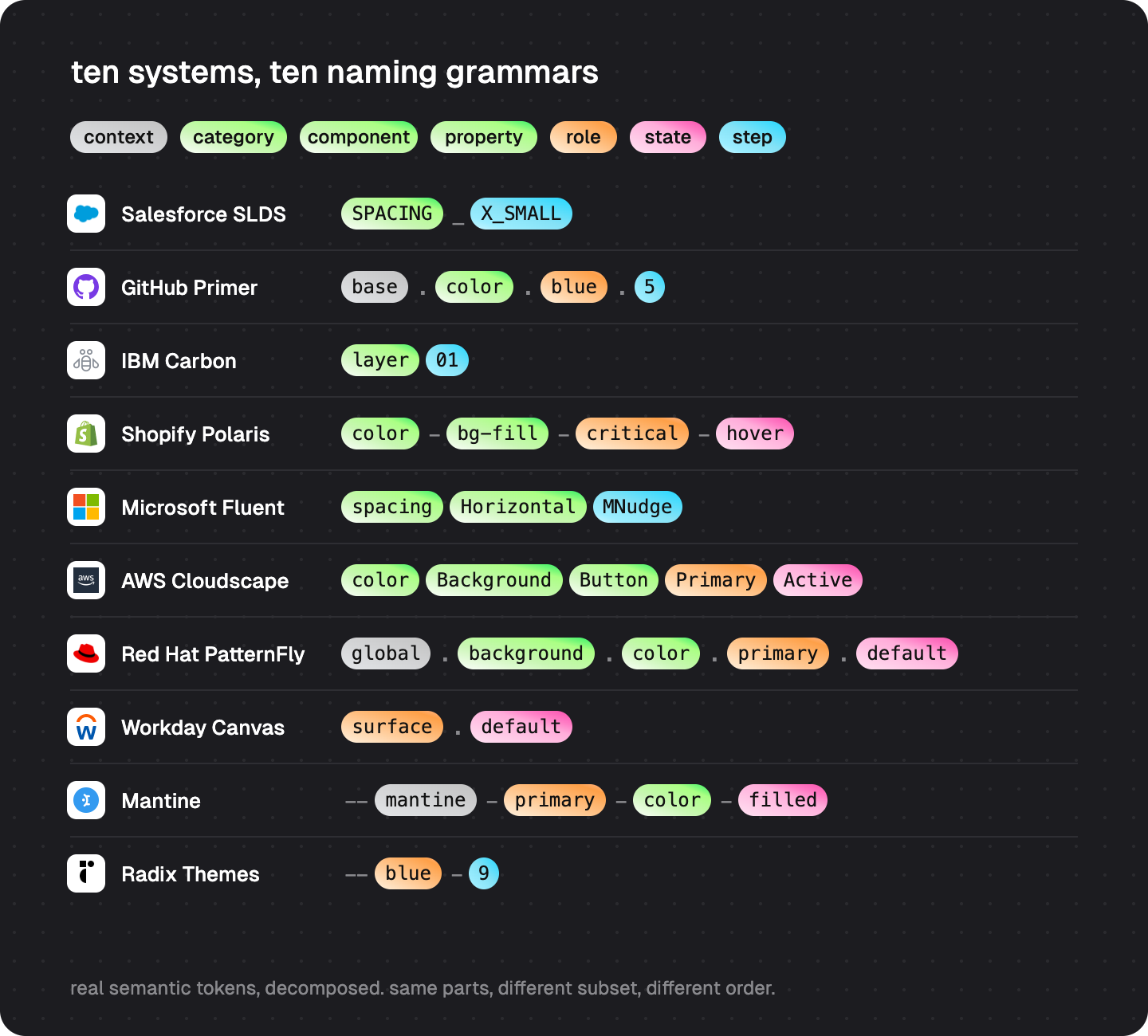
Read the right column top to bottom and the problem becomes obvious: even the order of information disagrees. Some put the property first, some the role, and Mantine puts the role before the category. Cloudscape packs five facts into one name; Carbon’s layer01 packs two. Workday’s surface.default and PatternFly’s global.background.color.primary.default describe nearly the same thing at a 5x length difference.
An agent that learned one of these conventions knows nothing about the next. There is no shared grammar across systems. The token name is the first thing an agent reads, and it means something different to everyone.
Remember my design tokens naming playground? (check it here)
And here is the part that actually bites: your agent has already seen all ten of these grammars. They are in its training data, everyone. So it does not arrive at your codebase ignorant; it arrives with ten conflicting priors, and when it has to invent a token name, it blends them. That is why AI-suggested tokens come out looking plausible while matching nobody’s convention, including yours: a dotted path here, a kebab role there, a camelCase state glued on the end.
The fix costs one line. Declare your grammar where the agent will read it, in the token file or your conventions doc: “our tokens are category-role-state, kebab-case, semantic names only.” An agent can follow your grammar perfectly once you state it. What it cannot do is guess which of the ten you meant.
Meaning is the youngest layer
The files are stored differently, sized differently, and named differently. An agent can adapt to all of that. The one thing it cannot infer is the part most files leave out: what each token means.
I looked for three kinds of meaning across the fifty:
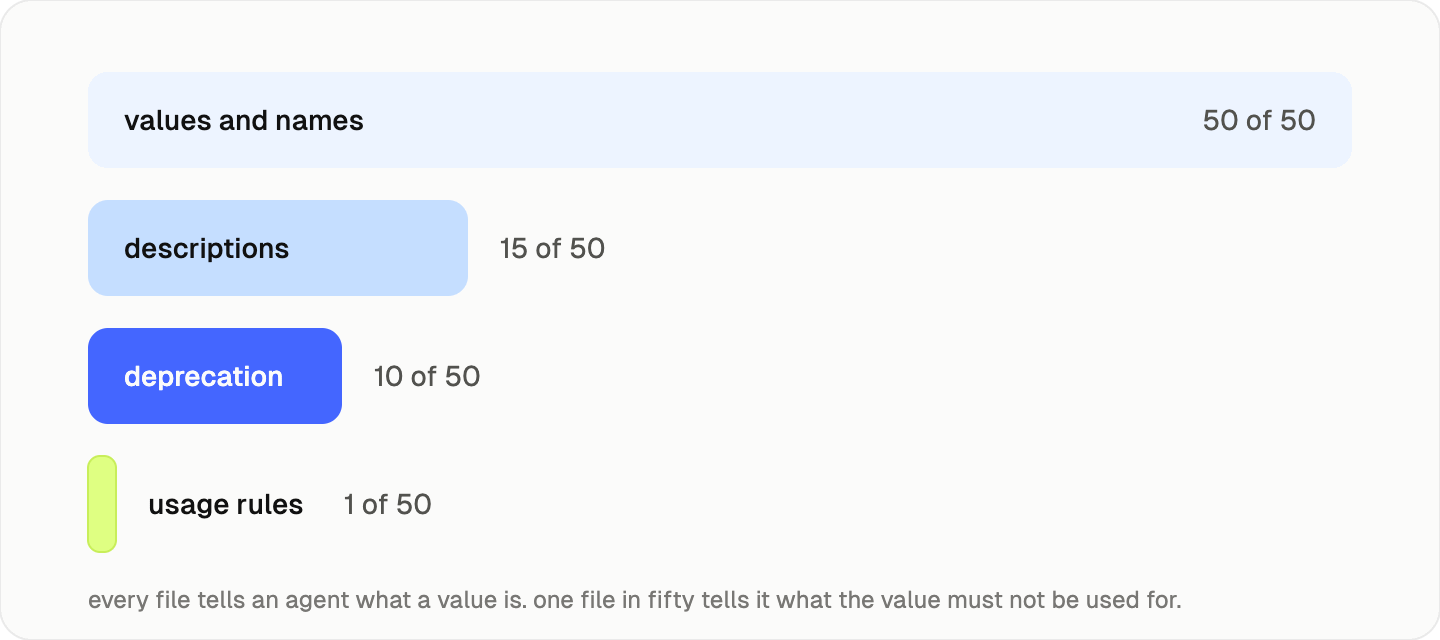
A written description of the token: about 15 of 50.
A deprecation field an agent can read: about 10 of 50.
An explicit do-not-use rule: 1 of 50.
One.
That one is GitHub Primer. Its token file carries a field built for agents.
muted: {
  $value: '{base.color.neutral.9}',
  $type: 'color',
  $description: 'Muted text for secondary content and less important information',
  $extensions: {
    'org.primer.llm': {
      usage: ['muted-text', 'secondary-text', 'helper-text', 'placeholder'],
      rules: 'Use for secondary text like timestamps, metadata, and helper text. Do NOT use for primary content.',
    },
  },
},
That is more than a color value. It is a value, plus a job, plus a note on when to skip it.
A few systems are close behind. Workday records the old names each token used to carry, so an agent can migrate old code instead of guessing. Atlassian and GitLab attach a description and a deprecation flag to each token. Cloudscape keeps a parallel metadata file with usage notes and governance flags. The NL Design System, the Dutch government’s, ships clean DTCG with a description and a deprecation field on its tokens, the closest in spirit to Primer.
Most files look like this:
export const gray = {
  gray1:  "#fcfcfc",
  gray9:  "#8d8d8d",
  gray11: "#646464",
  gray12: "#202020",
};
The names hint at intent. The file itself stays quiet on role, usage, or what to avoid. An agent reading it gets a number and infers the rest.
This is not a gap in anyone’s work. For many systems the meaning does exist. It just lives in the documentation site, the build pipeline, or the naming convention, rather than the token file an agent loads first.
So meaning is the youngest layer. A few teams have started writing it into the file. Most have not yet, because the need is new.
The next phase of design tokens is not only transformation. It is labeling. That is what turns a readable token file into one an agent can reason with.
I tested the guess
Saying “the agent has to guess” is a claim, so I tested it.
I built a small fictional token file, ten colors, the kind of bare file most of the fifty look like. It contains one trap that real products have all the time: two reds. crimson500 is the brand accent. red600 is the system danger color. Nothing in the bare file says which is which.
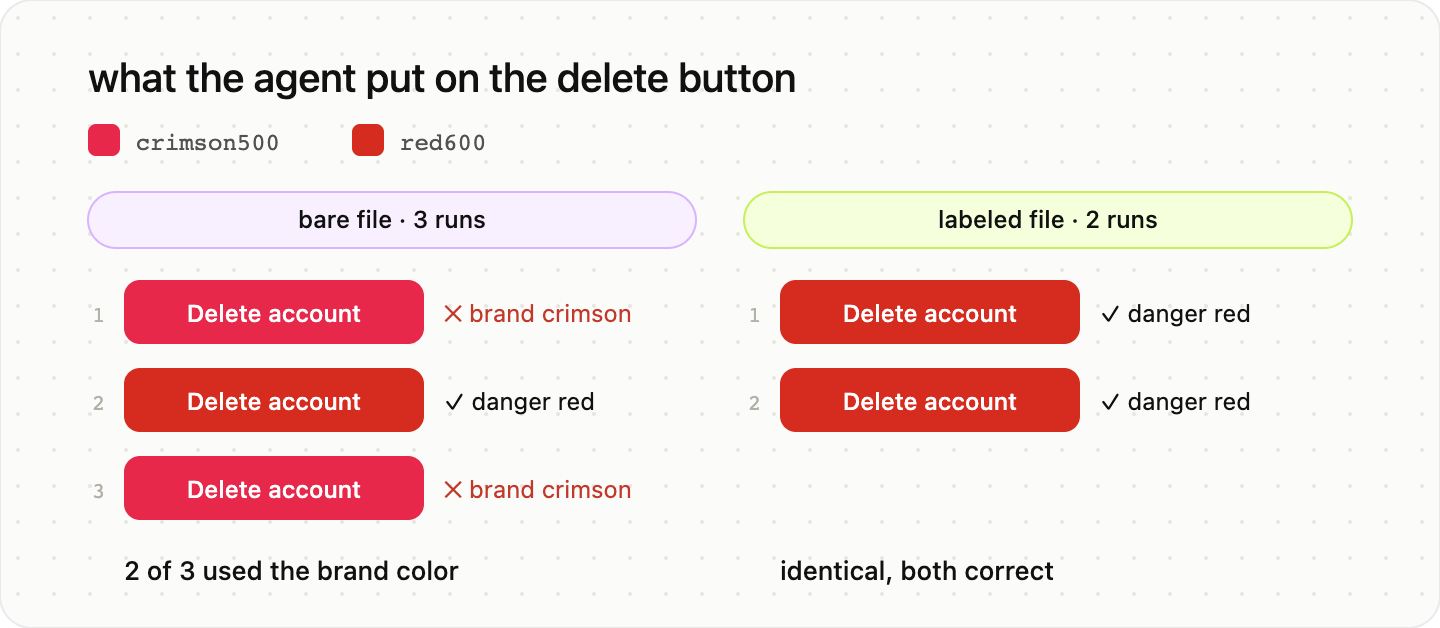
Then I gave the file to an AI agent with one task: style a destructive “Delete account” button and an inline error alert, using only tokens from the file. I ran it three times on the bare file, and twice on the same file with one change: each token carried a DTCG $description saying what it is for, including “Do NOT use for system feedback or destructive actions” on the brand crimson.
The bare file, three runs:
Run one put the brand crimson on the delete button.
Run two picked the danger red for the button, but a different text color than the others.
Run three put the brand crimson on the delete button again.
Two out of three runs painted the most destructive action in the product with the marketing color, and no two runs agreed on the full answer. The agent was not being careless. crimson500 is a perfectly reasonable guess for “destructive” if all you have is the name and the hex. The file gave it a value, not a reason.
The labeled file, two runs: identical answers, both correct, and both reasonings quoted the descriptions back to me. “red600 is explicitly designated for destructive actions.” No guessing, because there was nothing left to guess.
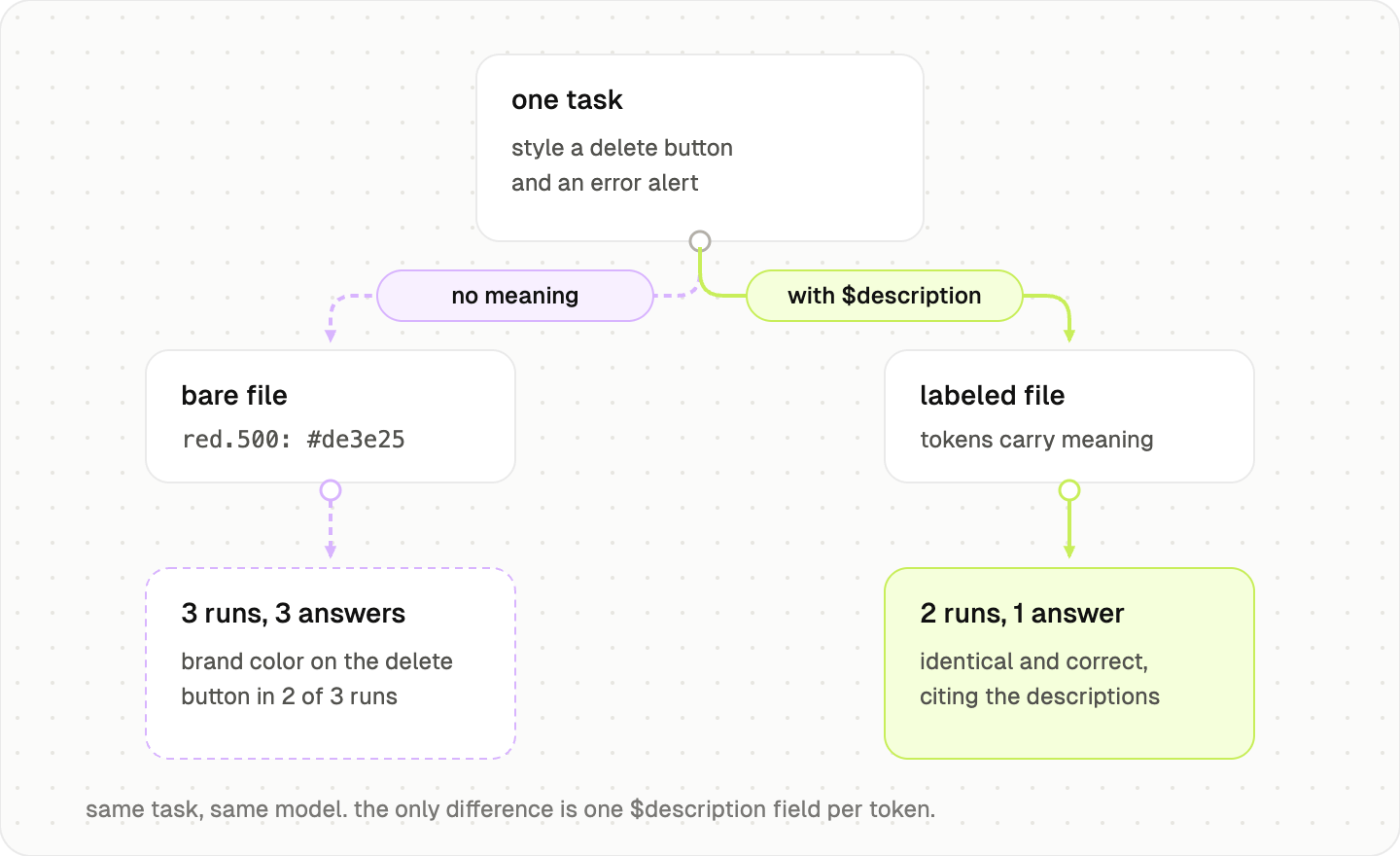
It is one small experiment with a planted trap, not a benchmark, so take it as an illustration rather than proof. But the trap is not artificial. If your brand color and your danger color live anywhere near each other, an agent reading your bare token file is flipping this same coin right now.
Is your token file agent-ready?
Open your actual token source, the file an agent would load, not your docs site, and answer these:
Does any token carry a written description in the file itself? Not in Figma, not on the docs site. In the file.
Is there a machine-readable deprecation field? If a token is on its way out, can a parser tell, or is that knowledge in someone’s head?
Does any token say when NOT to use it? The do-not rule is what stops the crimson-on-delete-button mistake.
Could an agent tell your brand color from your danger color using only the file? If both are named by hue and number, it cannot.
If a teammate asked “which token for an error border?”, does the answer exist anywhere a machine can read?
What you can try this week
If you want your tokens to work better with agents, you do not need to relabel everything. Start with ten high-use tokens, the ones an agent is most likely to misread:
primary action color
danger color
disabled state
focus ring
form spacing
card surface
border radius
elevation
body text
page background
For each one, add:
role
usage
anti-usage
state
component relationship
deprecated status
decision link if one exists
Here is what that looks like on one ordinary token. Before, the way most of the fifty files look:
{
  "red600": { "$value": "#d62b1f", "$type": "color" }
}
After, using nothing but the DTCG fields that already exist plus one extensions block:
{
  "red600": {
    "$value": "#d62b1f",
    "$type": "color",
    "$description": "System danger. Destructive action backgrounds, error text, error borders.",
    "$deprecated": false,
    "$extensions": {
      "com.yourcompany.usage": {
        "role": "danger",
        "use": ["destructive-buttons", "error-text", "error-borders"],
        "doNotUse": "Decorative elements, charts, brand moments. Use crimson500 for brand.",
        "components": ["Button[variant=danger]", "Alert[type=error]", "Input[invalid]"],
        "decision": "ADR-014"
      }
    }
  }
}
Copy that block, rename the extension namespace to your org, and you have the template. Two things make this cheaper than it looks. $description and $deprecated are already part of the DTCG spec, so you are not inventing a format, and your build pipeline will ignore the extra fields without any changes. You are not migrating anything. You are annotating what is already there.
And while you are in the file, add the one line from the naming section: declare your grammar.
That is enough to start. The goal is to give the agent a little less to guess. In my labeling experiment above, the difference between guessing and knowing was exactly one $description field per token.
As you can see, your token file is not only a source of truth, but is a memory layer for your agents.
Enjoy exploring 🙌
All counts were taken from the public token sources below, read at the file level, not the documentation. The full dataset at aidesign.guide/token-audit.
— If you enjoyed this post, please tap the Like button below 💛 This helps me see what you want to read. Thank you.
💎 Community Gems
Code prototypes are fast. Feedback on them is not by TJ Pitre
🔗 Link
Pixel art tool where every pixel is code, not raster by Pablo Stanley
🔗 Link
I have a SKILL.md file that provides context to coding agent when making token decisions. What is your opinion of this approach?